01 Notes
Write it once.
Take the lecture down as it happens, with equations, tables and an outline for the long ones. Every note lives inside its subject.
NoteFlow is the study app where your notes become flashcards, practice papers and challenges your friends can play, and each one comes back right before you’d forget it.
Early access. Opens to everyone in time for 2027.
A friend invited you. Reserve your spot to join them.
or try a 30-second challengeToday
Each morning NoteFlow lays out what’s due, what to revise and how long it will take, so you can just start.
Challenges
Any deck becomes a challenge link. Friends play it in their browser with no account, and the scoreboard fills up by lunch. Try this one: three questions on cell parts.
Scoreboard
8 playersBiologyCell partsfrom @maya_k
Question 1 of 3
Which part of the cell controls what it does?
A challenge link, the way your friends will see one.
You came 3rd of 9, in 0:24.
How it works
Most students keep notes in one app, flashcards in another and the exam date in a third. In NoteFlow each step hands its work to the next, so nothing is typed twice.
01 Notes
Take the lecture down as it happens, with equations, tables and an outline for the long ones. Every note lives inside its subject.
02 Notes → Flashcards
One step makes flashcards from any note, or from any answer the AI tutor gives you. Nothing is retyped.
03 Flashcards
Rate each card and NoteFlow brings it back the day you would otherwise lose it. Easy cards wait longer; hard ones come back tomorrow.
04 Practice exams → Flashcards
A timed practice exam is built from the same note. Anything you get wrong comes straight back as a new card.
05 Planner · Focus
Put the exam date in and revision lands in the days before it, next to your lectures and deadlines. It syncs with Google Calendar.
And round again. Every wrong answer feeds the next review, and every review is planned before the exam.
Also inside
AI tutor
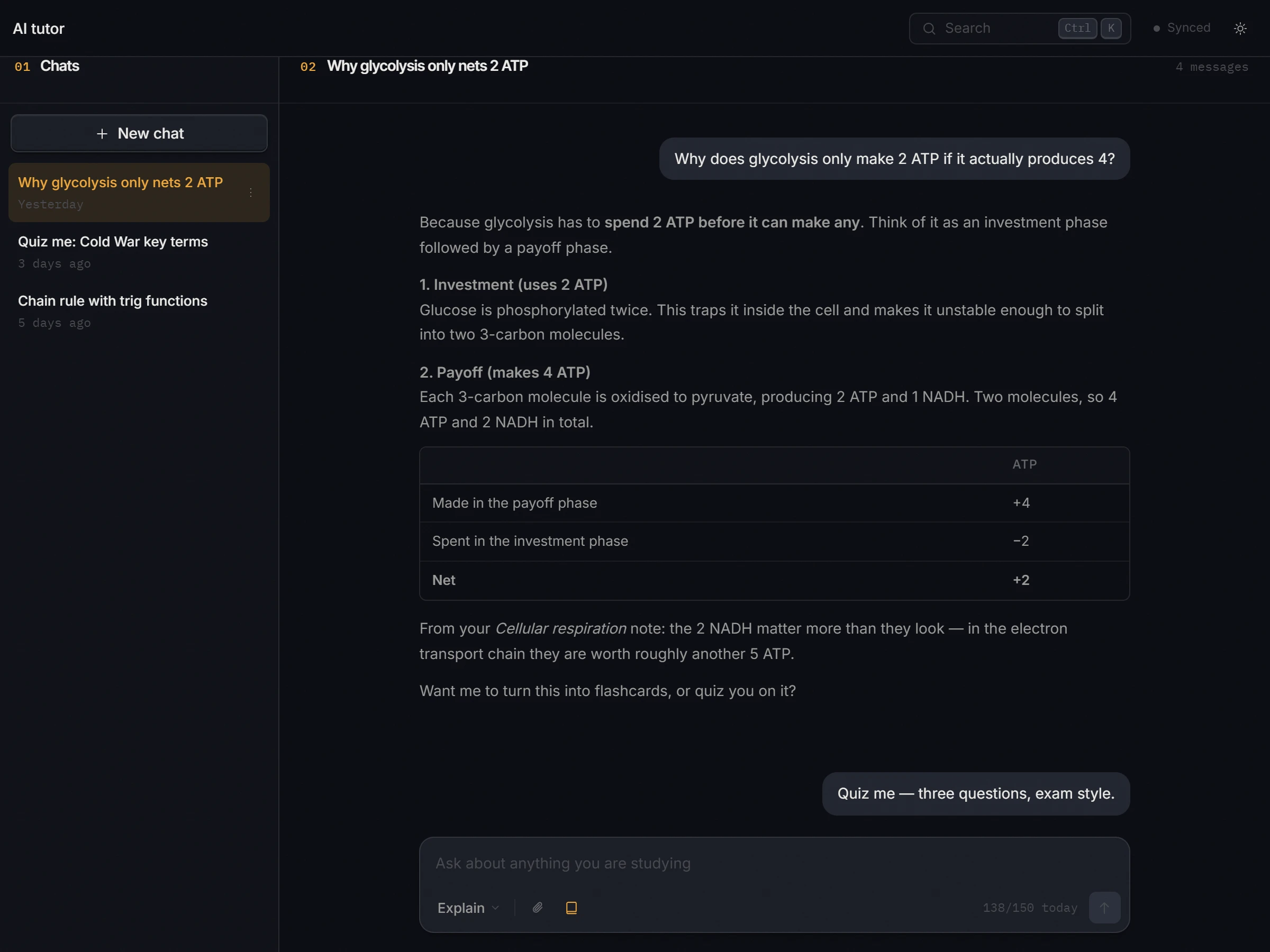
Models from OpenAI, Google and Anthropic, sitting next to your subjects and reading your own notes. Any answer becomes a note or a deck of cards in one step.
Focus
A timer that floats above every window, ambient radio that starts and stops with it, and a streak that survives the term.
Grades
87.4%
Weighted assessments and a running grade for every subject.
Google Calendar
Planner events and deadlines kept in step with the calendar you already use.
Offline
A local copy of everything, synced when you are back online.
Writing feedback
Comments on structure and clarity, never a rewrite. Windows app.
Your data
Export to Markdown, Word or plain text, or back up your whole library.
Fidgets
Small, quiet things to do between sessions.
Pricing
Notes, tasks, planner, Pomodoro, grades, flashcards and practice exams are free without limits. Plans add more AI requests, the most capable models and unlimited cloud sync.
| Feature | Free | Lite | PlusMost popular | Pro |
|---|---|---|---|---|
| Price | $0forever | $3.99per month | $7.99per month | $14.99per month |
| AI requests a day | 10 | 50 | 150 | Unlimited |
| Models | Fast | Fast | Fast and most capable | Fast and most capable |
| AI flashcards | Yes | Yes | Yes | Yes |
| Practice exams | Yes | Yes | Yes | Yes |
| Writing feedback (Windows) | 5 analyses | 5 analyses | 5 analyses | 5 analyses |
| Cloud sync | 200 records | Unlimited | Unlimited | Unlimited |
| Priority support | No | No | No | Yes |
| Reserve | Reserve | Reserve | Reserve |
Notes, tasks, decks, planner events and grades are unlimited on your own device on every plan. The Free cap of 200 counts only the live records kept in the cloud, so deleting things frees the allowance back up. Writing feedback is a Windows feature, and its five analyses are the same on every plan. Plans are chosen inside the app; prices are per month, in USD.
Privacy
Your notes sync to our servers.
Encrypted on the way there.
Never sold, to anyone.
And your work exports in one click.
Your notes, decks, tasks and plans are stored in your account on our servers so every device stays in step, and they travel over TLS. Passwords are salted and hashed with BCrypt. What you send to an AI feature goes to the model provider only to answer it, and your notes are never used to train our own models. We honour GDPR, CCPA and COPPA. Read the privacy policy and terms.
Questions
NoteFlow opens to everyone on the same day, in time for 2027. Reserve your spot with your email and we will write to you the day it opens. There is no queue and no waitlist position: everyone who reserved gets in at once.
Only your email address. No password and no code. You get a confirmation with your own invite link, and every friend who joins through it earns you free time on Plus or Pro once NoteFlow opens.
When NoteFlow opens, yes: you sign in with the address you reserved with, and that account keeps notes, flashcards, tasks and plans in sync between devices. Until then, your email is all it takes.
Yes. The full workspace — notes, flashcards, planner, grades, practice exams and the AI tutor — runs in any modern browser and syncs across your devices through the same account. It keeps a local copy too, so it keeps working when the connection does not.
Yes. A challenge is a link: anyone can open it on their phone and play straight away, with no account and nothing to install. They only sign in if they want to keep their place on the scoreboard.
Yes. Export notes as Markdown, Word or plain text, and create a full backup of your library from Settings at any time.
Open Support inside the app to file a ticket or ask a question. Pro plans receive priority support.